
NineAnts API guide
Connect to NineAnts by API in Excel, Power BI or another application
NineAnts collects your bank, payment and ERP data in one place and keeps it up to date. In NineAnts you can also create new forecast data. The API is how you get that data out again, into the applications you work in: your bank balances in an Excel sheet that refreshes with one click, your cash flow actuals in a Power BI report, or your forecast in your Treasury Management System or any other application. An application can also add or change rows in NineAnts. This guide shows how, in two steps.
How it works
You create a key
A key is a password for programs. You make it in NineAnts and choose which group and which data it may read.
You give it to your tool
Excel, Power BI or your own script keeps the key and shows it to NineAnts on each request.
Your tool gets the table
NineAnts sends the same rows and columns you see in the app. Nothing more.
1. Create your key
In NineAnts, open Account settings, then API keys
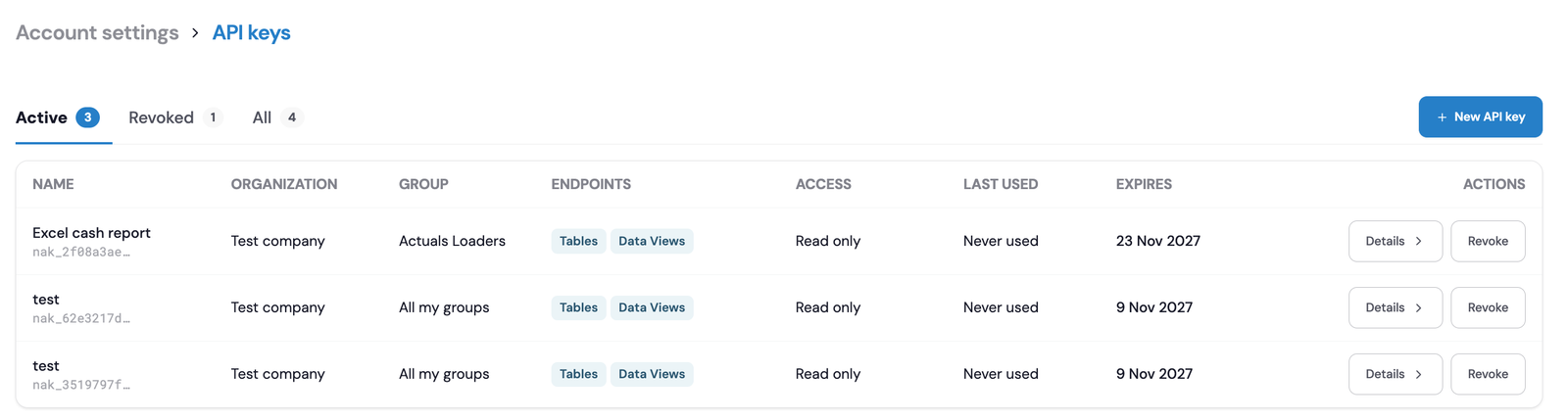
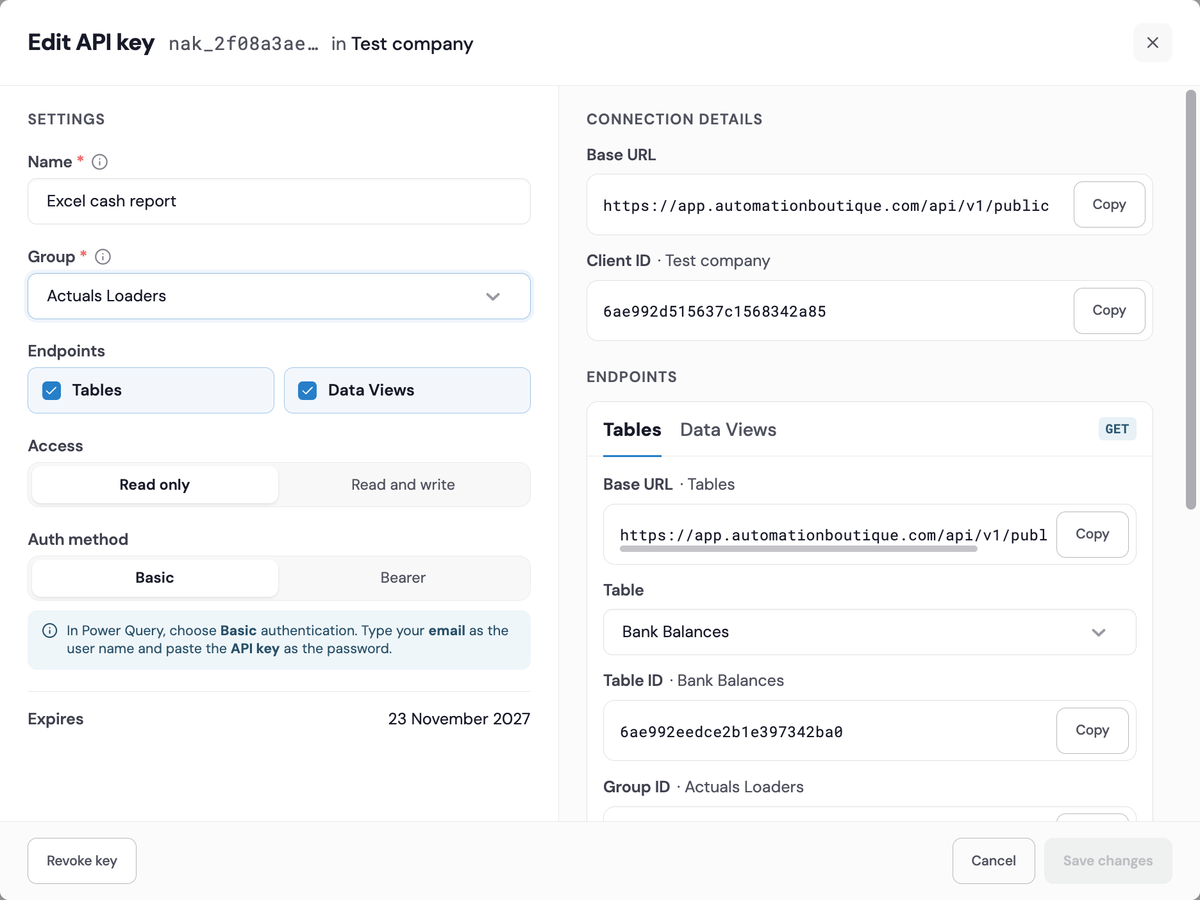
Choose New API key and fill in the form
- Organization and Group: the company whose data you want, and the group the key reads as. The key sees the rows and columns that group sees.
- Name: where you will use it, for example “Power BI finance refresh”.
- Endpoints: what the key may read: Tables, Data Views or both.
- Access: choose Read only unless your tool has to change data.
- Auth method: Basic for Excel and Power BI. Bearer for a key used only in scripts.
- Expiration: 30 days, 90 days, 1 year, your own date up to a year ahead, or No expiry.
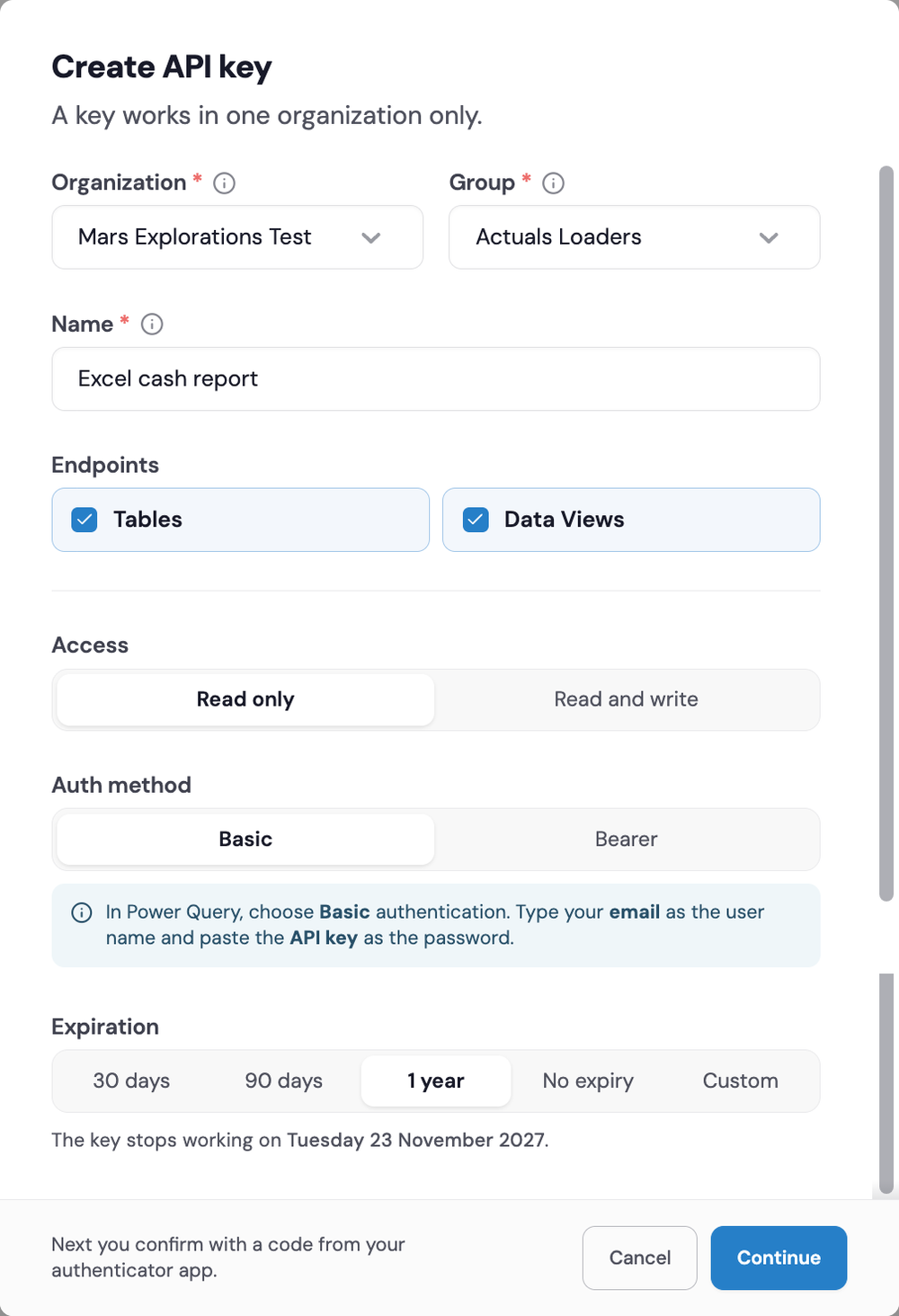
Confirm with the code from your authenticator app
Copy the key
The key starts with
nak_. NineAnts shows it once and does not store it, so copy it now.
A Read only key cannot change anything
2. Get your first data
Load a table into Excel
You need three things: the address of your table, your email, and a key with Auth method Basic.
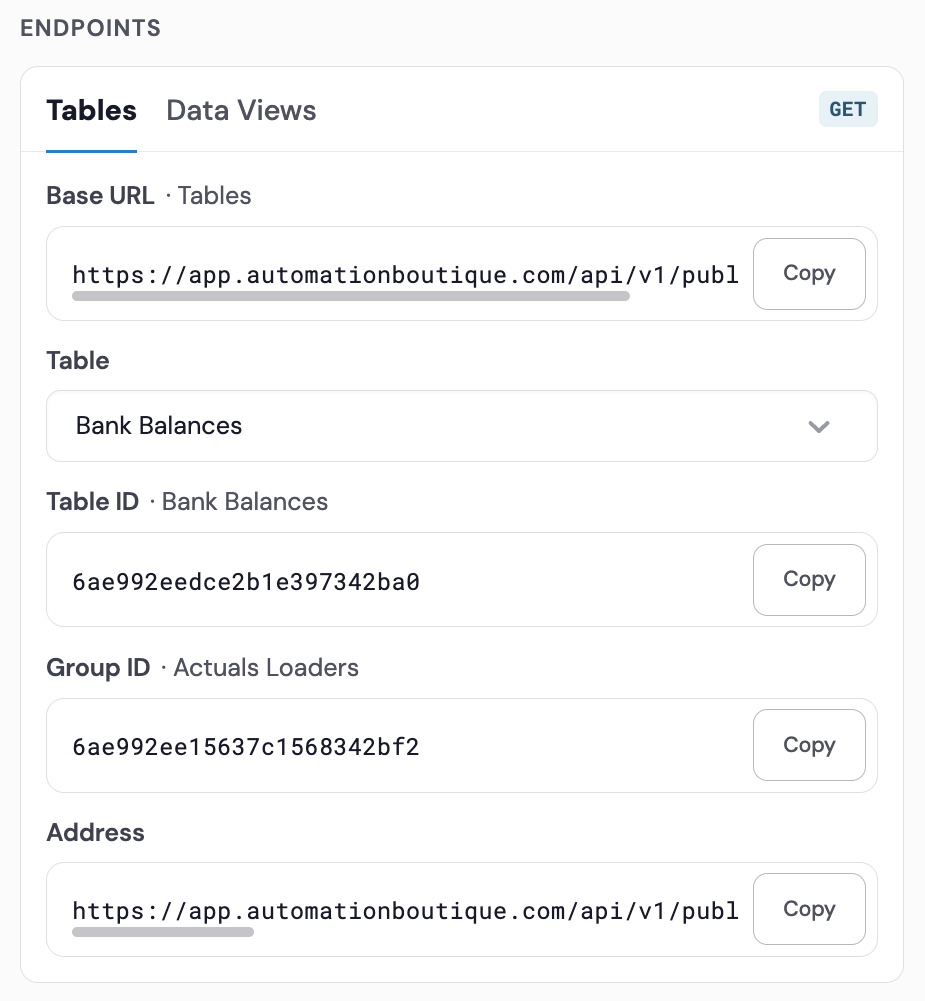
In NineAnts, copy the address of your table
Open Details on your key, choose the table, and choose Copy next to the address. The same box appears right after you create a key.
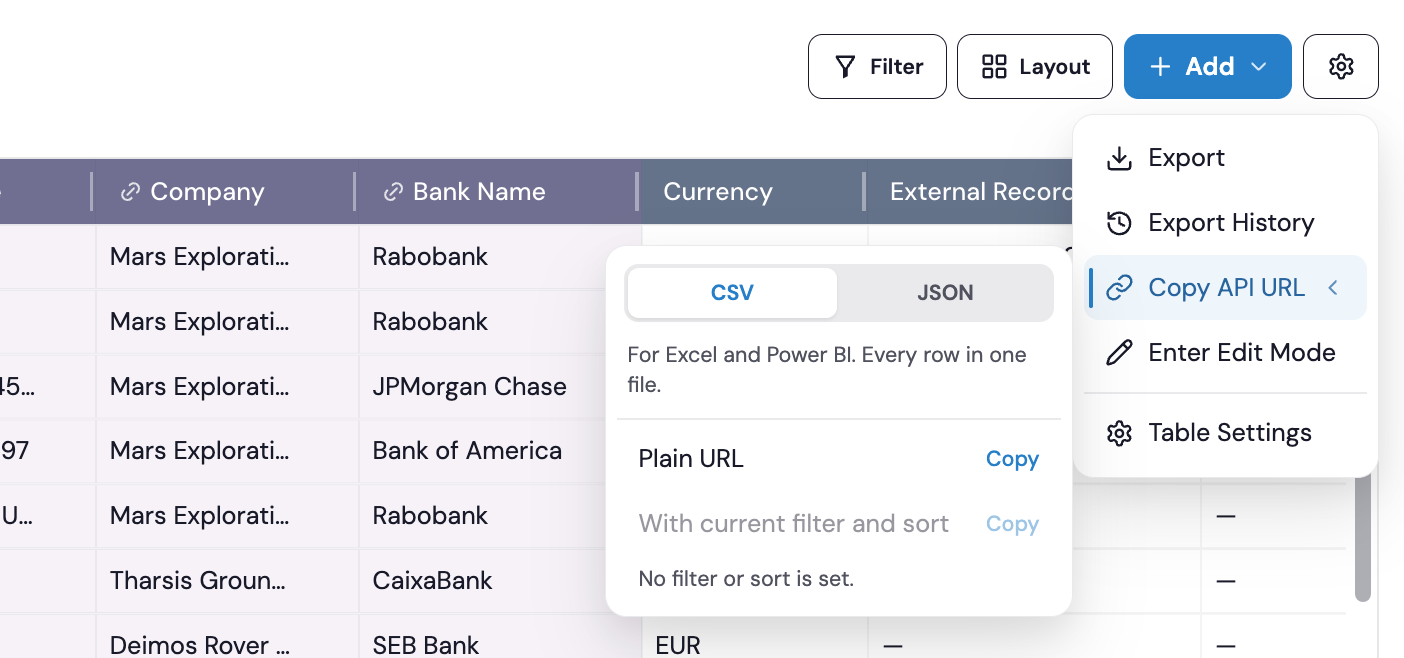
Or open the table itself and choose Copy API URL in its More actions menu. Choose CSV for Excel and Power BI.
In Excel, choose Data, Get Data, From Other Sources, From Web
Paste the address as the URL and choose OK. Leave the Basic or Advanced choice on this screen as it is.
When Excel asks how to sign in, choose Basic on the left
Type your NineAnts email as the user name. Paste your key as the password. Choose Connect.
Choose Load
Excel shows the rows under their column names and puts them on a sheet.
Check that it worked
Power BI
The steps are the same. Choose Get data, then Web, paste the address, choose Basic, and enter your email and the key.
I need a second table
Open Details on the same key, choose the other table and copy its address. Then repeat the Excel steps. Excel asks for the key only the first time.
Excel keeps asking me to sign in
- The user name must be the email of the person who made the key. Any other name, or an empty one, is refused.
- The key must have Auth method Basic. A Bearer key does not work in Excel or Power BI. You can change this under Details.
- Check under Account settings, API keys whether the key has expired or was revoked. A password reset also revokes your keys.
To enter a new key in Excel, go to Data, Get Data, Data Source Settings, Edit Permissions.
A colleague cannot refresh my workbook
The address names a group, and each key reads as one group. Your colleague needs their own key for the same group. If they are in a different group, they need the address with their group in it: they can copy it from Details on their own key.
Excel says “too many requests” on Refresh All
NineAnts sends one table per key at a time. Excel waits and tries again by itself. With more than about five large tables on one key, refresh them in smaller sets, or refresh the one that failed again.
My table has more than a million rows
One Excel sheet holds 1,048,575 rows, so NineAnts refuses a larger result. Filter the table in NineAnts first, then use Copy API URL: it can include the filter you have on screen. Or use this Power Query script, which reads the table page by page. Open a Blank Query, paste it into the Advanced Editor and fill in the three IDs. You find them under Details on your key.
let
    Base = "https://app.automationboutique.com/api/v1/public/tables/<table_id>/records",
    Params = [client_id = "<client_id>", group_id = "<group_id>", per_page = "1000"],

    GetPage = (pageKey as nullable text) =>
        Json.Document(
            Web.Contents(
                Base,
                [Query = if pageKey = null then Params else Params & [page_key = pageKey]]
            )
        ),

    Pages = List.Generate(
        () => GetPage(null),
        each _ <> null,
        each if [next_page_key] = null then null else GetPage([next_page_key]),
        each [data]
    ),

    Records = List.Combine(Pages),
    Rows = Table.FromRecords(List.Transform(Records, each [data]), null, MissingField.UseNull)
in
    Rows
Two things to avoid in Excel
- Do not choose Web API as the way to sign in. It puts the key in the address, which NineAnts refuses.
- Do not open the address in a browser and double-click the downloaded file. Use From Web, or Export in NineAnts.
Make your first call
For scripts, create the key with Auth method Bearer and send it in the Authorization header. This call asks NineAnts who the key belongs to.
export NINEANTS_API_KEY="nak_..."

curl -H "Authorization: Bearer $NINEANTS_API_KEY" \
  "https://app.automationboutique.com/api/v1/public/user/me"
Check that it worked
client_id and the key’s group under group_ids. You pass those two on every other call.Read a whole table
This script finds your organization and group, takes the first table and reads every record in it.
import os
import requests

BASE = "https://app.automationboutique.com/api/v1/public"

session = requests.Session()
session.headers["Authorization"] = f"Bearer {os.environ['NINEANTS_API_KEY']}"


def get(path, **params):
    response = session.get(f"{BASE}{path}", params=params, timeout=30)
    response.raise_for_status()
    return response.json()


# 1. Which organization and group does this key read as?
access = get("/user/me")["data"]["client_accesses"][0]
client_id = access["client_id"]
group_id = access["group_ids"][0]

# 2. Pick a table the group can read.
table = get("/tables/", client_id=client_id)["data"]["items"][0]

# 3. Read every record, page by page.
records, page_key = [], None
while True:
    params = {"client_id": client_id, "group_id": group_id, "per_page": 1000}
    if page_key:
        params["page_key"] = page_key
    page = get(f"/tables/{table['id']}/records", **params)
    records.extend(page["data"])
    page_key = page.get("next_page_key")
    if not page_key:
        break

print(f"{len(records)} records in {table['name']}")
Never put a key in the address
?api_key=..., is ignored and the request gets 401. A Bearer key goes in Authorization: Bearer. A Basic key goes in as the password, with your email as the user name: curl -u "[email protected]:nak_...".Next: the recipes cover filtering, syncing and writing. Every call is described in the API reference.
Words you will see
| Word | Looks like | What it means |
|---|---|---|
| API | A way for programs to ask NineAnts for data, the way you would ask by opening a screen. | |
| API key | nak_... | A password for programs. It belongs to you and reads as one group in one organization. |
| Organization | client_id | Your company’s NineAnts environment. |
| Group | group_id | A set of users with the same access. A group decides which rows and columns of a table you see. Each key reads as one group. |
| Endpoints | Tables, Data Views | The parts of NineAnts a key may read. You choose them when you create the key. |
| Auth method | Basic or Bearer | How a tool hands over the key. Excel and Power BI use Basic. Scripts can use Bearer. |
| Table | table_id | A set of rows with fixed columns, such as bank transactions or forecast lines. |
| Column ID | col_... | The fixed name of a column for programs. It stays the same when someone renames the column in the app. |
| Address | https://... | Where a program finds one thing in NineAnts, for example one table. Also called a URL or endpoint. |
Recipes
Get only the rows I need
Describe the rows as a small JSON object, encode it and pass it as filters on List records. This one asks for references that start with INV-2026 and amounts above 1000.
{
  "combine": "and",
  "filters": [
    { "field": "col_reference", "type": "string", "op": "starts", "value": "INV-2026" },
    { "field": "col_amount", "type": "number", "op": "gt", "value": 1000 }
  ]
}import base64, json
filters = {
"combine": "and",
"filters": [
{"field": "col_reference", "type": "string", "op": "starts", "value": "INV-2026"},
{"field": "col_amount", "type": "number", "op": "gt", "value": 1000},
],
}
encoded = base64.urlsafe_b64encode(json.dumps(filters).encode()).decode().rstrip("=")
# then: params={"filters": encoded, ...}Each condition needs field (a column ID, or created_on, updated_on, source_type), type, op and value. combine is and (default) or or. You can send up to 10 conditions.
type: string
| op | Meaning |
|---|---|
equals | Exact match, ignoring case. |
contains | Contains the text, ignoring case. |
starts | Starts with the text, ignoring case. |
ends | Ends with the text, ignoring case. |
in | Equals any value in a list (up to 50). |
contains_any, starts_any, ends_any | As contains, starts and ends, against a list of values. |
type: number
| op | Meaning |
|---|---|
eq | Equal to. |
gt, gte | Greater than, greater than or equal to. |
lt, lte | Less than, less than or equal to. |
between | From value to value2, both included. |
in | Equals any value in a list (up to 50). |
type: boolean
| op | Meaning |
|---|---|
eq | true or false. |
type: datetime
| op | Meaning |
|---|---|
before | Before the date and time. |
after | After the date and time. |
between | From value to value2, both included. |
Keep a copy up to date without reading everything again
- First run: note the time, then read every record.
- Later runs: note the time, then read with
updated_sinceset to the time of the previous run. - Add
include_deleted=trueto also hear about deleted records. They come back withis_deleted: true.
curl -H "Authorization: Bearer $NINEANTS_API_KEY" \
"https://app.automationboutique.com/api/v1/public/tables/$TABLE_ID/records?client_id=$CLIENT_ID&group_id=$GROUP_ID&updated_since=2026-03-20T00:00:00Z&include_deleted=true"Read a large table page by page
- Send the first request without
page_key. Ask for up to 1000 records withper_page. - Read
next_page_keyfrom the answer and send the same request again withpage_keyset to it. - Stop when
next_page_keyisnull.
The quickstart script under “I write code” does exactly this. Rows added while you read do not shift the pages still to come.
Add many rows at once
Use Create many records with a Read and write key. Send up to 100 rows per request. The answer is 200 even when some rows fail, so always read the errors list. For tables with 50 or more columns, send 50 rows at a time.
Change a value without overwriting someone else’s edit
Send the value you expect the record to hold now as previous_data. If someone changed it in the meantime, nothing is written and you get 409 with the record as it is now.
curl -X PATCH -H "Authorization: Bearer $NINEANTS_API_KEY" \
  -H "Content-Type: application/json" \
  -d '{"data": {"col_amount": 3000.00}, "previous_data": {"col_amount": 2750.00}, "reason": "Corrected amount"}' \
  "https://app.automationboutique.com/api/v1/public/tables/$TABLE_ID/records/$RECORD_ID?client_id=$CLIENT_ID&group_id=$GROUP_ID"
When something goes wrong
Every refusal comes with a number and a short message. The number tells you what kind of problem it is.
| You see | It means | What to do |
|---|---|---|
| 401 | NineAnts does not accept the sign-in. | Check the user name (your email), the Auth method of the key, and that the key is complete, not expired and not revoked. |
| 403 | The key is fine, but it may not do this. | A Read only key cannot write. Otherwise check the key’s group and endpoints under Details, your modules, or whether the table is locked. |
| 404 | That table or record does not exist in your organization. | Check the IDs in the address. |
| 400 | Something in the request is wrong. | Read the message: it names the parameter or column. |
| 409 | Someone changed the record after you read it. | Look at the current values in the answer and decide again. |
| 429 | Too many requests in a short time. | Wait a moment and try again. Excel does this by itself. |
| 500 or 503 | A problem on our side, or the table is busy. | Try again shortly. Contact support if it keeps happening. |
All 401 messages
| message | Cause |
|---|---|
Authentication required | No key was sent. |
Invalid API key | No key matches what was sent. |
API key revoked | The key was revoked, or its owner’s password was reset. |
API key expired | The key is past its expiry date. Create a new key. |
User name required: use the key owner’s email | A Basic key was sent without a user name. |
User name does not match this API key | The user name is not the email of the key’s owner. |
This API key takes Bearer sign-in only | A Bearer key was sent by Basic, for example from Excel. |
This API key takes Basic sign-in only | A Basic key was sent as Authorization: Bearer. |
API key owner is inactive | The owner’s account is deactivated. |
API key owner no longer has access to this client | The owner left the key’s organization. |
Client is inactive | The key’s organization is deactivated. |
All 403 messages for a key
| message | Cause |
|---|---|
API key is read-only | A write with a Read only key. |
You do not have access to this group | The group_id is not the key’s group, or you are no longer in that group. On a Data View the message is Forbidden. |
This API key cannot use /tables | The key’s endpoints leave out Tables (or Data Views, with /dataviews). |
What an error looks like, for developers
Errors are JSON with status: "error" and a message. Validation errors and conflicts add an errors list, and a conflict adds current_record.
{
  "status": "error",
  "message": "Conflict: record was modified since last read",
  "errors": [
    { "loc": "data.col_currency", "msg": "Expected 'EUR' but found 'USD'", "type": "conflict" }
  ],
  "current_record": {
    "_id": "65f1a2b3c4d5e6f7a8b9c0d2",
    "data": { "col_currency": "USD" },
    "updated_on": "2026-03-22T12:00:00"
  }
}
A request stopped by our firewall has error_code: "EDGE_BLOCKED" and a request_id. With status 400 or 413 the request was too large: send a smaller batch. With 403 on ordinary business data, send us the request_id.
Looking after your key
| Do | Why |
|---|---|
| Make one key per tool or report. | You can stop one without breaking the others. |
| Choose Read only unless the tool has to write. | A leaked Read only key cannot change your data. |
| Keep the key out of workbooks, emails and chat. | Anyone who has the key can use it until it is revoked. |
| Revoke a key the moment you doubt it. | Revoking needs no authenticator code and works at once. |
| Give a key an expiry date when the work has an end. | A forgotten key that never expires keeps working for whoever holds it. |
- To replace a key, create a new one and revoke the old one. A key cannot be shown again or renewed.
- Under Details you can change a key’s name, group, endpoints, access and Auth method. That asks for your authenticator code.
- A key with an expiry date sends you a reminder by email 14, 7, 3 and 1 days before it stops. A key with No expiry works until you revoke it, so keep it somewhere safe.
- You can have 10 active keys.
- A password reset revokes all your keys. A key also stops when you leave the organization or your account is deactivated.
- NineAnts emails you each time a key is created on your account. The email never contains the key.
- The first part of a key, such as
nak_7f3a9c21, is its ID. It is safe to share with support.
API reference
For developers. Every path comes after the base URL. Requests use HTTPS, answers are JSON, and dates and times are ISO 8601 in UTC. Open a row for parameters, an example and a sample answer.
https://app.automationboutique.com/api/v1/publicUser and groups
Start here. These two calls give you the client_id and group_id that every other call needs.
Who am IGET/user/meAny key
Returns the key owner, the key’s organization and group, and the key itself. Every key can call this.
curl -H "Authorization: Bearer $NINEANTS_API_KEY" \
"https://app.automationboutique.com/api/v1/public/user/me"{
"status": "success",
"data": {
"id": "507f1f77bcf86cd799439011",
"email": "[email protected]",
"name": "Jane Doe",
"client_accesses": [
{
"client_id": "60d5ecb74f421a3b9c5e1a01",
"client_name": "Acme Corp",
"role_type": "manager",
"group_ids": ["60d5ecb74f421a3b9c5e2a01"]
}
],
"api_key": {
"id": "6720a1b2c3d4e5f6a7b8c9d0",
"name": "Power BI finance refresh",
"prefix": "nak_7f3a9c21",
"access": "read",
"group_id": "60d5ecb74f421a3b9c5e2a01",
"endpoints": ["tables"],
"expires_on": null
}
}
}- With an API key, client_accesses holds exactly one entry: the key’s organization.
- group_ids holds the key’s one group. That is the group_id to pass on every other call.
- api_key.endpoints lists what the key may call: "tables", "dataviews" or both. null means all endpoints. expires_on is null for a key without an expiry date.
List groupsGET/user/groupsAny key
Returns the key’s group with its name. Every key can call this.
Query parameters
| Parameter | Required | Description |
|---|---|---|
client_id | Yes | The organization. Take it from GET /user/me. |
include_all | No | Managers only. true returns every group in the organization, by name. The key still reads as its own group only. |
curl -H "Authorization: Bearer $NINEANTS_API_KEY" \
"https://app.automationboutique.com/api/v1/public/user/groups?client_id=$CLIENT_ID"{
"status": "success",
"data": [
{
"id": "60d5ecb74f421a3b9c5e2a01",
"name": "Treasury",
"description": "Group treasury team",
"created_on": "2025-06-15T08:00:00+00:00",
"updated_on": "2026-02-10T12:30:00+00:00"
}
]
}Tables
List tablesGET/tables/Any key
Lists the tables the key’s group can read.
Query parameters
| Parameter | Required | Description |
|---|---|---|
client_id | Yes | The organization. Take it from GET /user/me. |
per_page | No | Tables per page. Default 50, maximum 100. |
page_key | No | Cursor from the previous response. |
curl -H "Authorization: Bearer $NINEANTS_API_KEY" \
"https://app.automationboutique.com/api/v1/public/tables/?client_id=$CLIENT_ID"{
"status": "success",
"data": {
"items": [
{
"id": "65a1b2c3d4e5f6a7b8c9d0e1",
"name": "Bank transactions",
"description": "Booked transactions from all bank accounts",
"data_mode": "editable",
"created_on": "2026-01-15T10:30:00+00:00",
"updated_on": "2026-03-20T14:22:00+00:00",
"groups": [
{ "id": "60d5ecb74f421a3b9c5e2a01", "name": "Treasury" }
]
}
],
"pagination": {
"per_page": 50,
"next_page_key": null,
"total_items": 12
}
}
}- Keep the trailing slash in /tables/.
- groups shows which groups can reach the table.
Get a tableGET/tables/{table_id}Any key
Returns one table with its columns. This is where you find the column IDs (col_...) that records, filters and sorting use.
Query parameters
| Parameter | Required | Description |
|---|---|---|
client_id | Yes | The organization. Take it from GET /user/me. |
group_id | Yes | The key’s group. Its row filters and column access apply. Take it from GET /user/me. Any other group gets 403. |
curl -H "Authorization: Bearer $NINEANTS_API_KEY" \
"https://app.automationboutique.com/api/v1/public/tables/$TABLE_ID?client_id=$CLIENT_ID&group_id=$GROUP_ID"{
"status": "success",
"data": {
"id": "65a1b2c3d4e5f6a7b8c9d0e1",
"name": "Bank transactions",
"description": "Booked transactions from all bank accounts",
"data_mode": "editable",
"schema_config": {
"json_schema": {
"properties": {
"col_reference": { "type": "string", "title": "Reference" },
"col_amount": { "type": "number", "title": "Amount" },
"col_counterparty": {
"type": "string",
"title": "Counterparty",
"x-lookup-config": {
"table_id": "65a1b2c3d4e5f6a7b8c9d0e2",
"store_column": "col_name",
"display_columns": []
}
}
}
}
},
"field_registry": {
"fields": {
"col_reference": { "label": "Reference", "type": "string", "order": 0 },
"col_amount": { "label": "Amount", "type": "number", "order": 1 }
}
},
"groups": [
{ "id": "60d5ecb74f421a3b9c5e2a01", "name": "Treasury" }
]
}
}Records
A record is one row of a table. Its values sit under data, keyed by column ID.
List recordsGET/tables/{table_id}/recordsAny key
Returns the rows the group can see, one page at a time, with optional filters, sorting and incremental sync.
Query parameters
| Parameter | Required | Description |
|---|---|---|
client_id | Yes | The organization. Take it from GET /user/me. |
group_id | Yes | The key’s group. Its row filters and column access apply. Take it from GET /user/me. Any other group gets 403. |
format | No | json (default) or csv. See All records as CSV below. |
per_page | No | Records per page. Default 100, maximum 1000. |
page_key | No | Cursor from the previous response. |
filters | No | Base64-URL encoded filter object. See Filtering. |
sort_by | No | A column ID, or created_on, updated_on or source_type. |
sort_dir | No | asc or desc. Default desc. |
updated_since | No | ISO 8601 date and time. Returns only records changed since then. See Incremental sync. |
include_deleted | No | true also returns deleted records. Default false. |
curl -H "Authorization: Bearer $NINEANTS_API_KEY" \
"https://app.automationboutique.com/api/v1/public/tables/$TABLE_ID/records?client_id=$CLIENT_ID&group_id=$GROUP_ID&per_page=500"{
"status": "success",
"data": [
{
"_id": "65f1a2b3c4d5e6f7a8b9c0d1",
"data": {
"col_reference": "INV-2026-001",
"col_amount": 1500.0,
"col_counterparty": "Acme Supplies"
},
"source_type": "user",
"created_on": "2026-03-20T10:00:00+00:00",
"updated_on": "2026-03-20T14:30:00+00:00",
"is_deleted": false
}
],
"next_page_key": "eyJ2IjogMSwgImsiOiAiNjVmMWEyYjNjNGQ1ZTZmN2E4YjljMGQxIn0",
"per_page": 500
}- Here next_page_key and per_page sit next to data. In List tables they sit inside data.pagination.
All records as CSVGET/tables/{table_id}/records?format=csvAny key
The same call as List records with format=csv: every matching row as one CSV file. Made for From Web in Excel and Power BI, which send one request and cannot page.
Query parameters
| Parameter | Required | Description |
|---|---|---|
client_id | Yes | The organization. Take it from GET /user/me. |
group_id | Yes | The key’s group. Its row filters and column access apply. Take it from GET /user/me. Any other group gets 403. |
format | Yes | csv |
filters | No | Base64-URL encoded filter object, as for JSON. |
sort_by, sort_dir | No | Order of the rows. A sort makes a large file slower to start. |
curl -H "Authorization: Bearer $NINEANTS_API_KEY" \
"https://app.automationboutique.com/api/v1/public/tables/$TABLE_ID/records?client_id=$CLIENT_ID&group_id=$GROUP_ID&format=csv"Reference,Amount,Counterparty
INV-2026-001,1500.0,Acme Supplies- The first line holds the column names as you see them in the app, in the table’s column order. Columns the group cannot see are left out.
- Without sort_by, rows come in no set order.
- More than 1,048,575 matching rows gets 400: that is the most one Excel sheet holds. Narrow them with filters, or read page by page as JSON.
- per_page, page_key, include_deleted and updated_since are ignored for CSV.
- One CSV is written per key at a time. A second one gets 429 with a Retry-After header of 15 to 120 seconds. Excel waits and tries again by itself.
- Use this address in From Web only. Do not download the file and open it by double-clicking: Excel then runs cells that start with =, +, - or @ as formulas. For a file to open directly, use Export in the app.
Get a recordGET/tables/{table_id}/records/{record_id}Any key
Returns one record. 404 Record not found when it does not exist.
Query parameters
| Parameter | Required | Description |
|---|---|---|
client_id | Yes | The organization. Take it from GET /user/me. |
group_id | Yes | The key’s group. Its row filters and column access apply. Take it from GET /user/me. Any other group gets 403. |
curl -H "Authorization: Bearer $NINEANTS_API_KEY" \
"https://app.automationboutique.com/api/v1/public/tables/$TABLE_ID/records/$RECORD_ID?client_id=$CLIENT_ID&group_id=$GROUP_ID"{
"status": "success",
"data": {
"_id": "65f1a2b3c4d5e6f7a8b9c0d1",
"data": {
"col_reference": "INV-2026-001",
"col_amount": 1500.0
},
"source_type": "user",
"created_on": "2026-03-20T10:00:00+00:00",
"updated_on": "2026-03-20T14:30:00+00:00",
"is_deleted": false
}
}Create a recordPOST/tables/{table_id}/recordsNeeds a Read and write key
Adds one row to the table.
Query parameters
| Parameter | Required | Description |
|---|---|---|
client_id | Yes | The organization. Take it from GET /user/me. |
group_id | Yes | The key’s group. Its row filters and column access apply. Take it from GET /user/me. Any other group gets 403. |
JSON body
| Field | Type | Required | Description |
|---|---|---|---|
data | object | Yes | The values, keyed by column ID. |
curl -X POST -H "Authorization: Bearer $NINEANTS_API_KEY" \
  -H "Content-Type: application/json" \
  -d '{"data": {"col_reference": "INV-2026-042", "col_amount": 2750.00}}' \
"https://app.automationboutique.com/api/v1/public/tables/$TABLE_ID/records?client_id=$CLIENT_ID&group_id=$GROUP_ID"{
"status": "success",
"data": {
"id": "65f1a2b3c4d5e6f7a8b9c0d2",
"table_id": "65a1b2c3d4e5f6a7b8c9d0e1",
"data": {
"col_reference": "INV-2026-042",
"col_amount": 2750.0
},
"source_type": "user",
"created_on": "2026-03-21T09:15:00+00:00"
}
}- The new record’s ID comes back as id here, and as _id when you read it.
- The table’s data mode decides whether rows can be added. See Data modes.
Update a recordPATCH/tables/{table_id}/records/{record_id}Needs a Read and write key
Changes the fields you send and leaves the rest. Send previous_data to make sure nobody changed the record since you read it.
Query parameters
| Parameter | Required | Description |
|---|---|---|
client_id | Yes | The organization. Take it from GET /user/me. |
group_id | Yes | The key’s group. Its row filters and column access apply. Take it from GET /user/me. Any other group gets 403. |
JSON body
| Field | Type | Required | Description |
|---|---|---|---|
data | object | Yes | The fields to change, keyed by column ID. |
previous_data | object | No | The values you expect the record to hold now. Its keys must also be in data. If a value differs, nothing is written and you get 409. |
reason | string | No | Why the change was made. Kept in the record’s history. |
curl -X PATCH -H "Authorization: Bearer $NINEANTS_API_KEY" \
  -H "Content-Type: application/json" \
  -d '{"data": {"col_amount": 3000.00}, "previous_data": {"col_amount": 2750.00}, "reason": "Corrected amount"}' \
"https://app.automationboutique.com/api/v1/public/tables/$TABLE_ID/records/$RECORD_ID?client_id=$CLIENT_ID&group_id=$GROUP_ID"{
"status": "success",
"data": {
"_id": "65f1a2b3c4d5e6f7a8b9c0d2",
"data": {
"col_reference": "INV-2026-042",
"col_amount": 3000.0
},
"updated_on": "2026-03-21T09:20:00+00:00"
}
}Delete a recordDELETE/tables/{table_id}/records/{record_id}Needs a Read and write key
Marks the record as deleted. It stays readable with include_deleted=true, but there is no restore: create the row again if you need it back.
Query parameters
| Parameter | Required | Description |
|---|---|---|
client_id | Yes | The organization. Take it from GET /user/me. |
group_id | Yes | The key’s group. Its row filters and column access apply. Take it from GET /user/me. Any other group gets 403. |
reason | No | Why the record was deleted. |
curl -X DELETE -H "Authorization: Bearer $NINEANTS_API_KEY" \
"https://app.automationboutique.com/api/v1/public/tables/$TABLE_ID/records/$RECORD_ID?client_id=$CLIENT_ID&group_id=$GROUP_ID&reason=Duplicate%20entry"204 No ContentRecord historyGET/tables/{table_id}/records/{record_id}/historyAny key
Returns the edits made to one record: what changed, who changed it and why.
Query parameters
| Parameter | Required | Description |
|---|---|---|
client_id | Yes | The organization. Take it from GET /user/me. |
group_id | Yes | The key’s group. Its row filters and column access apply. Take it from GET /user/me. Any other group gets 403. |
limit | No | Entries to return. Default 50, maximum 200. |
curl -H "Authorization: Bearer $NINEANTS_API_KEY" \
"https://app.automationboutique.com/api/v1/public/tables/$TABLE_ID/records/$RECORD_ID/history?client_id=$CLIENT_ID&group_id=$GROUP_ID"{
"status": "success",
"data": [
{
"field_changes": { "col_amount": 3000.0 },
"previous_values": { "col_amount": 2750.0 },
"reason": "Corrected amount",
"actor": { "user_email": "[email protected]" },
"created_on": "2026-03-21T09:20:00+00:00"
}
]
}Bulk writes
Both bulk calls answer 200 even when some rows fail. Always read the errors array. The response has no status and data wrapper.
Create many recordsPOST/tables/{table_id}/records/bulk-createNeeds a Read and write key
Adds up to 100 rows in one request.
Query parameters
| Parameter | Required | Description |
|---|---|---|
client_id | Yes | The organization. Take it from GET /user/me. |
group_id | Yes | The key’s group. Its row filters and column access apply. Take it from GET /user/me. Any other group gets 403. |
JSON body
| Field | Type | Required | Description |
|---|---|---|---|
records | array | Yes | 1 to 100 items, each with a data object. |
curl -X POST -H "Authorization: Bearer $NINEANTS_API_KEY" \
  -H "Content-Type: application/json" \
  -d '{"records": [
        {"data": {"col_reference": "INV-043", "col_amount": 500}},
        {"data": {"col_reference": "INV-044", "col_amount": 750}}
      ]}' \
"https://app.automationboutique.com/api/v1/public/tables/$TABLE_ID/records/bulk-create?client_id=$CLIENT_ID&group_id=$GROUP_ID"{
"success": ["65f1a2b3c4d5e6f7a8b9c0d3"],
"errors": [
{
"index": 1,
"message": "Validation failed for field col_amount",
"code": "VALIDATION_ERROR"
}
]
}- success lists the IDs of the rows that were created. index in errors is the position of the failed row in your records array.
- Wide tables need smaller batches. See Request size.
Update many recordsPOST/tables/{table_id}/records/bulk-updateNeeds a Read and write key
Changes up to 1000 rows in one request.
Query parameters
| Parameter | Required | Description |
|---|---|---|
client_id | Yes | The organization. Take it from GET /user/me. |
group_id | Yes | The key’s group. Its row filters and column access apply. Take it from GET /user/me. Any other group gets 403. |
JSON body
| Field | Type | Required | Description |
|---|---|---|---|
updates | array | Yes | 1 to 1000 items. Each has record_id, data and optionally previous_data, as in Update a record. |
reason | string | No | Written to the history of every row in the request. Maximum 500 characters. |
curl -X POST -H "Authorization: Bearer $NINEANTS_API_KEY" \
  -H "Content-Type: application/json" \
  -d '{"updates": [
        {"record_id": "65f1a2b3c4d5e6f7a8b9c0d3", "data": {"col_amount": 550}, "previous_data": {"col_amount": 500}},
        {"record_id": "65f1a2b3c4d5e6f7a8b9c0d4", "data": {"col_amount": 800}}
      ]}' \
"https://app.automationboutique.com/api/v1/public/tables/$TABLE_ID/records/bulk-update?client_id=$CLIENT_ID&group_id=$GROUP_ID"{
"success": ["65f1a2b3c4d5e6f7a8b9c0d3"],
"errors": [
{
"record_id": "65f1a2b3c4d5e6f7a8b9c0d4",
"field": "col_amount",
"message": "Expected 100 but found 200",
"code": "CONFLICT"
}
]
}- code is CONFLICT when previous_data no longer matches, and VALIDATION when a value was refused.
Lookup values
Values of a lookup columnGET/tables/{table_id}/lookup-values/{column_id}Any key
Some columns only accept values from another table, for example a counterparty list. This returns the allowed values, with search.
Query parameters
| Parameter | Required | Description |
|---|---|---|
client_id | Yes | The organization. Take it from GET /user/me. |
group_id | Yes | The key’s group. Its row filters and column access apply. Take it from GET /user/me. Any other group gets 403. |
search | No | Text to search for. |
limit | No | Values to return. Default 50, maximum 200. |
page_key | No | Cursor from the previous response. |
curl -H "Authorization: Bearer $NINEANTS_API_KEY" \
"https://app.automationboutique.com/api/v1/public/tables/$TABLE_ID/lookup-values/col_counterparty?client_id=$CLIENT_ID&group_id=$GROUP_ID&search=Acme"{
"status": "success",
"data": {
"options": [
{
"label": "Acme Supplies",
"value": "Acme Supplies",
"derived": { "col_counterparty_code": "ACM-002" }
}
],
"has_more": false,
"next_page_key": null
}
}- A lookup column is one with x-lookup-config in the table’s schema (see Get a table).
- derived holds values from linked columns, and is only present when the lookup has them.
Data Views
A Data View is a read-only view over the files NineAnts has imported. It needs the Data Views module.
Rows of a Data ViewGET/dataviews/{view_id}/dataAny key
Returns the rows of one Data View, one page at a time.
Query parameters
| Parameter | Required | Description |
|---|---|---|
client_id | Yes | The organization. Take it from GET /user/me. |
group_id | Yes | A group that the Data View is shared with. Another group gets 400 Group not applicable to view. |
per_page | No | Rows per page. Default 100, maximum 1000. |
page_key | No | Cursor from the previous response. |
sort_by | No | A column name, or one of created_on, updated_on, row_number, batch_number, file_name. Default updated_on. |
sort_dir | No | asc or desc. Default desc. |
updated_since | No | ISO 8601 date and time. Returns rows changed at or after it. |
filters | No | Base64-URL encoded filter object, as in Filtering. Name columns as data.<column name>. type is optional here. |
include_schema | No | true adds the view’s columns to the response as data.schema. |
curl -H "Authorization: Bearer $NINEANTS_API_KEY" \
"https://app.automationboutique.com/api/v1/public/dataviews/$VIEW_ID/data?client_id=$CLIENT_ID&group_id=$GROUP_ID&include_schema=true"{
"status": "success",
"data": {
"rows": [
{
"id": "66b1a2b3c4d5e6f7a8b9c0d1",
"client_id": "60d5ecb74f421a3b9c5e1a01",
"file_name": "statement_2026-03-20.csv",
"relative_path_from_chroot": "bank/statement_2026-03-20.csv",
"file_metadata_id": "66b1a2b3c4d5e6f7a8b9c0aa",
"parse_config_id": "66b1a2b3c4d5e6f7a8b9c0bb",
"row_number": 1,
"batch_number": 1,
"data": {
"Account": "NL91ABNA0417164300",
"Amount": "1500.00"
},
"created_on": "2026-03-20T10:00:00+00:00",
"updated_on": "2026-03-20T10:00:00+00:00"
}
],
"pagination": {
"per_page": 100,
"next_page_key": null
}
}
}Which writes a table allows
Each table has a data_mode. A write the mode does not allow gets 403, also with a Read and write key.
| data_mode | Create | Update | Delete |
|---|---|---|---|
locked | No | No | No |
append_only | Yes | No | No |
append_enrichable | Yes | Limited | No |
editable | Yes | Yes | Yes |
Limits
| Limit | Value |
|---|---|
| Requests | 10 per second per IP address. Short bursts of up to 20 more are slowed down. Beyond that you get 429. |
| Connections at the same time | 50 per IP address. |
| CSV downloads | One per key at a time. |
| Active keys | 10 per user. |
| Request body | 16 MB. |
| Values in one request | Fewer than 5000, counting every field of every row. |
| Bulk create | 100 records per request. |
| Bulk update | 1000 records per request. |
Support
Stuck, or missing something? Contact us through NineAnts support. Include the key’s ID (such as nak_7f3a9c21, never the full key) and the time of the request. Changes to the API are announced in the release notes.